
Imagine you built a beautiful toy store, but you put it in the middle of a deep, dark forest where no roads exist.
Nobody would ever find it, right?
That is exactly what happens when you build a website without search engine optimization (SEO).
If people cannot find your website on Google, it gets lost in the giant digital noise of the internet.
At Seo Expert Service, we help businesses build clear, sunny roads straight to their online stores so thousands of visitors can walk right in.
Today, we are going to look at the ultimate tool for building websites that Google absolutely loves.
We will answer the big question: why wordpress is best for seo?
Let us dive right into this easy guide and learn everything together!
Table of Contents
Is SEO Dead in 2026? (The Rise of AI Search)
You might have heard some internet rumors lately.
Some people are asking: Is SEO dead?
The short answer is: No, it is not dead at all! But it is changing very quickly.
Conventional or old-school SEO is shifting to make room for brilliant artificial intelligence (AI) systems.
Today, millions of people use AI search tools every single day to find answers.
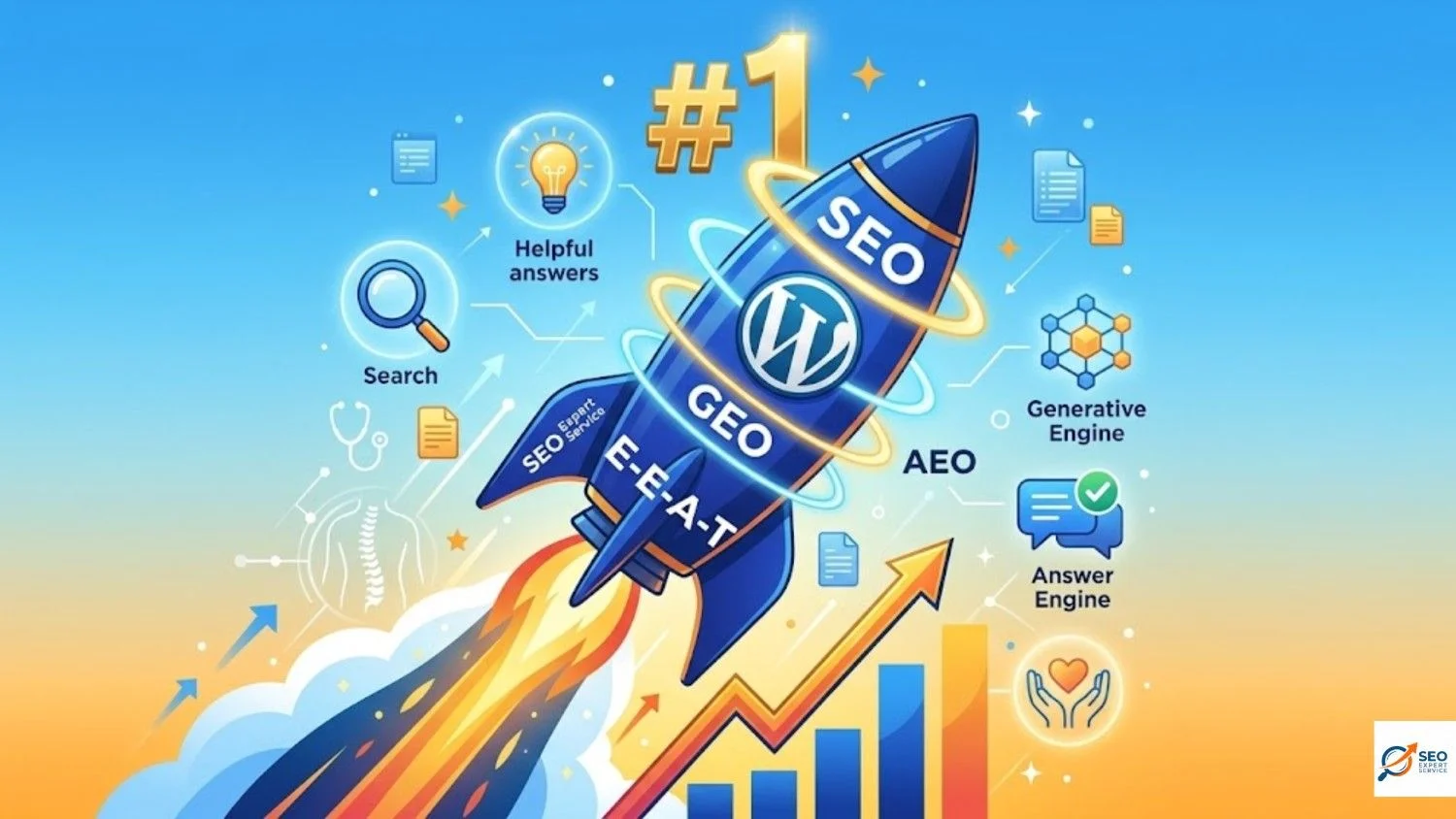
Because of this, we now have cool new terms you should know:
- AEO (Answer Engine Optimization): Making your website give the perfect, direct answer to a voice or text question.
- GEO (Generative Engine Optimization): Helping AI models find your website and talk about it in their summaries.
- E-E-A-T: This stands for Experience, Expertise, Authoritativeness, and Trustworthiness. It means Google wants to show real information written by real experts who know their stuff.
Traditional search methods and new AI-driven searches are working together right now.
To win the top spot on the web, you need a website platform that can handle both.
That is where WordPress comes to save the day!
What is SEO for WordPress and What is Organic Traffic?
Before we look under the hood, let us learn two simple definitions.
What is WordPress SEO?
WordPress SEO is the simple process of fixing and polishing a WordPress website so it can rank much higher in search results.
It is like cleaning the windows of your shop and putting up bright signs so passing traffic can see you clearly.
What is Organic Traffic?
Organic traffic refers to the group of online visitors who land on your website completely naturally without you paying for advertisements.
When you type a question into Google, you will see a mix of sponsored ads and normal search results.
When someone clicks on your normal, non-paid link, that counts as free organic traffic!
Fun Internet Fact: Only about 9% of people ever scroll all the way to the bottom of the very first Google results page. That is why landing right at the top is so incredibly important!
Why Enhancing Your Organic Traffic Matters
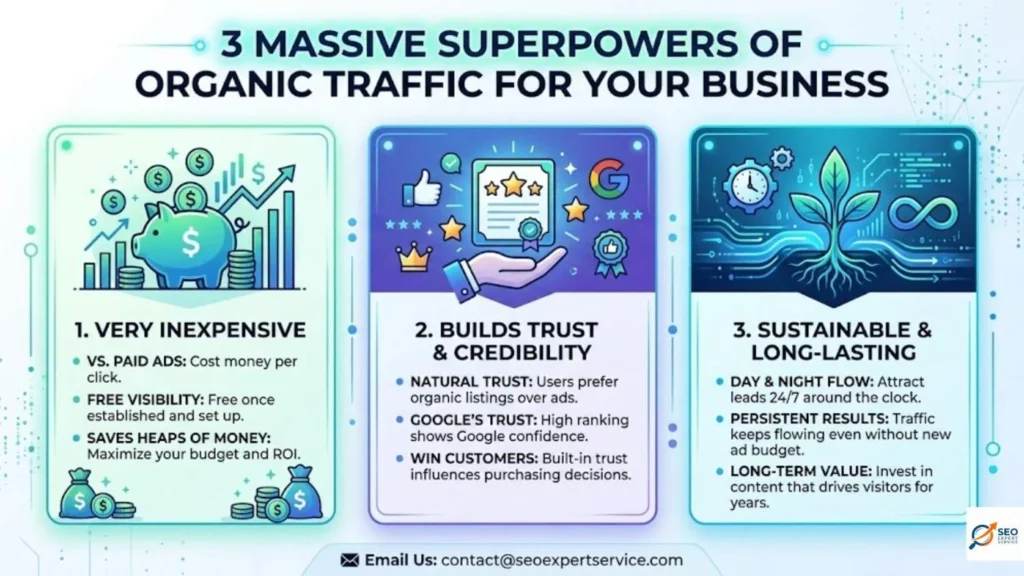
Getting free organic traffic to your website provides three massive superpowers for your business:
- It is Very Inexpensive: Unlike paid ads that cost money every single time someone clicks, organic traffic is completely free once you set it up. It saves you heaps of money.
- It Builds Trust and Credibility: People naturally trust unpaid search results way more than labeled advertisements. A high ranking shows that Google trusts you, so customers will too.
- It is Sustainable and Long-Lasting: When your budget runs out, paid ads instantly stop working. But good organic traffic keeps flowing day and night, bringing you new leads for a long time.
The Architecture of Visibility: Why WordPress Dominates the Search Landscape
WordPress is a massive powerhouse that currently runs more than 40% of all websites on the entire internet.
It started out a long time ago as a simple tool for writing personal blogs.
Over the years, it evolved into a highly advanced system that can run everything from tiny local businesses to massive corporate online stores.
Google’s engineering teams have even openly praised WordPress for being built with highly compliant, clean code.
When the underlying structure of a website is neat and tidy, it creates a transparent framework.
This clean code makes it effortless for search engine “crawlers” to read, scan, and understand your website.
What are Crawlers?
Think of crawlers as friendly, automated internet spiders sent out by Google.
Their daily job is to travel across the web, read pages, and decide if the content is helpful enough to save in Google’s massive index card library.
If your website has messy or broken code, the spiders get confused, turn around, and leave.
Because WordPress keeps its code clean, the spiders can index your pages perfectly every single time.
Core WordPress SEO Features & Benefits
Let us look at the top reasons why wordpress is best for seo and how it helps you grow.
1. WordPress is Free to Use
WordPress itself is open-source software, meaning it is 100% free for anyone to download and modify.
You just need to get cost-effective web hosting, which is like renting a small piece of land on the internet where your digital house will sit.
Because the software costs nothing, you can spend your budget on creating helpful articles instead.
2. Precision Permalink Management
A permalink is the permanent website address link for your blog posts and pages.
WordPress gives you total control over how these links look.
Instead of a confusing, messy link like [yoursite.com/?p=123](https://yoursite.com/?p=123),
you can easily change it to a clean link like [yoursite.com/why-wordpress-is-best-for-seo](https://yoursite.com/why-wordpress-is-best-for-seo).
[Bad Link] –> yoursite.com/?p=123 (Confuses Google & Users)
[Good Link] –> yoursite.com/blog/topic-name (Clear & Clean)
Clean URLs tell search crawlers and human readers exactly what is on the page before they even click it.
This simple fix boosts your click-through rate (CTR) and helps you rank much higher.
3. Scalable Metadata Architecture
Your meta titles and meta descriptions are like the digital billboards for your business inside Google’s search results.
WordPress allows you to change and optimize these titles and descriptions for every single page effortlessly.
You can write custom summaries that include your favorite keywords to convince people to click on your link instead of your competitors.
4. No Coding Knowledge Required
Years ago, you had to hire an expensive computer programmer if you wanted to change something on your website.
With WordPress, you do not need to write a single line of complex code.
The user-friendly dashboard lets anyone change text, update titles, and post new images with just a few clicks of a mouse.
5. High-Performance Image SEO and Accessibility
Images make your website fun to read, but they can slow things down if they are too heavy.
WordPress makes it incredibly simple to optimize your pictures.
You can easily add “Alternative Text” (called alt text) to describe what is inside each photo.
This helps visually impaired readers understand your site and allows your images to rank perfectly inside Google Image search results.
6. Super Fast Speed and Core Web Vitals
Website loading speed is a critical factor for ranking high on Google.
If a page takes more than a few seconds to load, visitors will get annoyed, hit the back button, and leave.
This creates a high bounce rate, which tells Google your site might not be very helpful.
WordPress is built to be extremely lightweight and fast out of the box.
When combined with premium tools like NitroPack or caching systems, it helps your site achieve elite speed scores that make both users and search engines happy.
7. Mobile-First Optimization and Responsiveness
More than 60% of all web searches happen on mobile phones and tablets today.
Because of this, Google uses “mobile-first indexing,” meaning it judges your website based on how good it looks on a phone screen.
The vast majority of WordPress themes are fully responsive by default, meaning they automatically shrink or stretch to fit any phone, tablet, or large desktop monitor flawlessly.
8. Safe, Secure, and Protected
A hacked website can be completely removed from Google’s search results to protect internet users.
Thankfully, WordPress has a massive global team of security developers who constantly release security updates to patch bugs and keep hackers away.
It gives you total confidence that your online reputation is safe.
9. Inbuilt Blogging Platform (Content is King)
Since WordPress was originally created for bloggers, its content editing tools are second to none.
The modern Gutenberg block editor allows your marketing team to craft beautiful, media-rich articles with simple drag-and-drop blocks.
Regularly publishing high-quality, helpful content is the number one way to build high authority with Google.
10. Better Site Structure and Internal Linking
Internal linking means adding links within your articles that point to other pages on your own website.
This helps your human readers navigate around your site and find more answers easily.
It also helps Google’s search spiders crawl through all your pages without getting stuck in a dead-end corner.
WordPress makes adding these internal links as simple as highlighting a word and pasting a URL.
11. Schema Markup and Rich Snippets
Have you ever searched for a recipe or a product and seen those cool star ratings, prices, or review scores directly inside the Google results?
That is called schema markup or rich snippets.
WordPress lets you add this special code to your pages easily using basic plugins.
It makes your search listing look much more appealing and drives way more clicks to your site.
12. Omnichannel and Social Media Integrations
SEO does not live on a lonely island all by itself.
A winning digital strategy connects your website to your social media channels like LinkedIn, Facebook, and X.
WordPress acts as a central hub, allowing you to automatically share new blog posts to your social feeds, embed user reviews, and sync lead data directly into your customer tracking systems.
13. Regular Updates and a Massive Helpful Community
Because WordPress is used by millions of people, it has the largest and most vibrant community of web helpers in the world.
If you ever run into an SEO problem or need a custom feature, there are thousands of free video tutorials, forums, and expert guides available online to help you solve it in minutes.
The Secret Weapon: Robust WordPress SEO Plugins
While the basic core version of WordPress is great for SEO, its true secret weapon is its endless library of plugins.
Plugins are like little apps or add-ons you can install onto your website dashboard to give it instant superpowers.
Here are the best ones used by professional teams today:
All-in-One SEO Suites
- Yoast SEO: The most famous SEO plugin in the world. It gives you a simple green light when your page is perfectly optimized for your chosen keywords and reads easily.
- Rank Math: A highly advanced, fast plugin that gives you incredible control over your schema markup, keyword tracking, and search settings.
- All in One SEO Pack: Another fantastic tool that automatically generates sitemaps and helps you manage your meta information without any stress.
Speed and Performance Boosters
- WP Rocket & W3 Total Cache: These plugins compress your website files and use smart caching to ensure your pages load up in the blink of an eye.
- Smush: This helpful tool automatically shrinks and optimizes heavy images as you upload them so they never slow down your site.
Analytics and Security Tools
- Google Site Kit: This official plugin hooks your WordPress dashboard up to Google Analytics and Search Console so you can see exactly how many people are visiting your site.
- Wordfence Security: A digital shield that sets up a secure firewall and malware scanner to protect your website from online threats.
Pros and Cons of Using WordPress for SEO
To be completely honest and fair, let us look at both sides of the coin so you can make the smartest choice for your brand.
| The Good Things (Pros) PDF | The Tricky Things (Cons) PDF |
| Huge ecosystem of free plugins and themes | You have to buy and set up your own web hosting |
| Complete control over your URLs and permalinks | Installing too many plugins can slow down your site |
| Clean code that makes search crawlers happy | Plugins require regular updates so they do not break |
| Massive, friendly community support online | Advanced speed tweaks can require technical help |
| Perfect for small blogs and massive stores | Needs ongoing security management to stay safe |
How to Set Up and Do SEO on WordPress (Step-by-Step Guide)
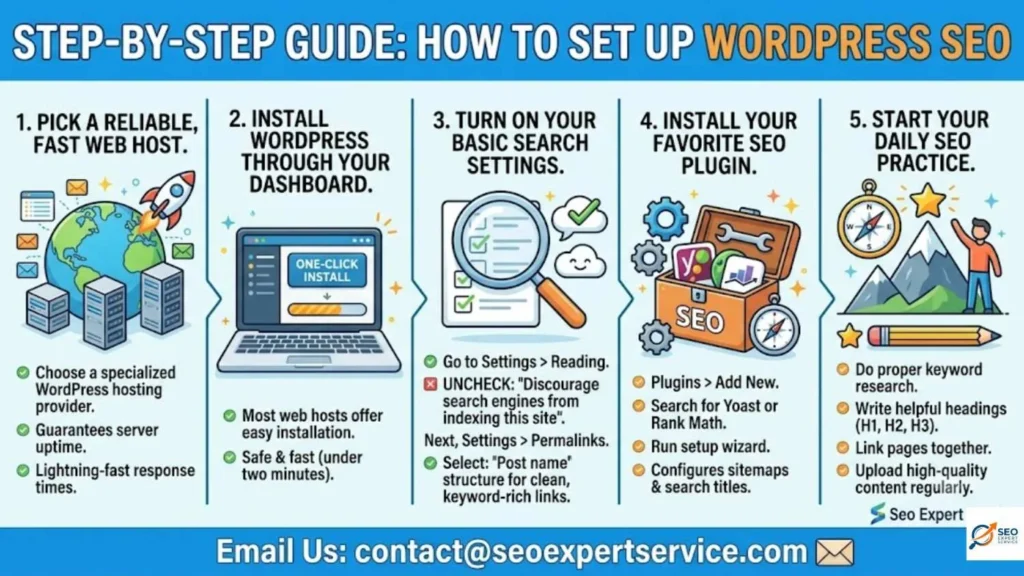
Ready to start ranking and winning new customers? Follow this simple step-by-step checklist to launch your site the right way:
Step 1: Pick a Reliable, Fast Web Host
Your website speed depends heavily on where your files live.
Choose a specialized WordPress hosting provider that guarantees great server uptime and lightning-fast response times.
Step 2: Install WordPress Through Your Dashboard
Most modern web hosts offer an easy, one-click button inside their control panel to install WordPress safely in under two minutes.
Step 3: Turn on Your Basic Search Settings
Once you log in, go to your Settings > Reading dashboard area.
Make sure the box that says “Discourage search engines from indexing this site” is completely unchecked!
If it is checked, Google will ignore your website entirely!
Next, head over to Settings > Permalinks and select the “Post name” structure.
This guarantees your website links stay clean and keyword-rich.
Step 4: Install Your Favorite SEO Plugin
Go to the Plugins > Add New tab, search for a top tool like Yoast SEO or Rank Math, and hit install.
Run through their automated setup wizard to configure your basic sitemaps and search titles.
Step 5: Start Your Daily SEO Practice
Now you are ready to dominate the web!
Make sure to do proper keyword research, write helpful heading tags (H1, H2, H3), link your pages together, and upload high-quality content regularly.
WordPress vs The Competitors (Wix, Squarespace, Shopify, and Webflow)
How does WordPress stack up against other popular website builders? Let us compare them head-to-head.
WordPress vs Wix
Wix uses a basic drag-and-drop system that is very easy for absolute beginners who want to build a quick site.
However, it gives you far less control over advanced SEO settings and deep code customization compared to WordPress.
WordPress vs Squarespace
Squarespace is famous for creating gorgeous, visual website templates out of the box.
While it is simple to manage, it has limited plugin tools, making it tough to execute large-scale or highly complex SEO strategies.
WordPress vs Shopify
Shopify is an incredible, all-in-one platform built purely for selling online products.
If you are only running an e-commerce shop, Shopify is fantastic.
But if you want deep content marketing, a powerful blog engine, and total SEO flexibility, WordPress mixed with WooCommerce wins every single time.
WordPress vs Webflow
Webflow is a fantastic, modern alternative that writes ultra-clean semantic code and includes built-in SEO tools for marketing teams without needing plugins.
- Choose WordPress if: You are building a content-heavy news site, a massive personal blog, or an enterprise-scale online store that needs ultimate plugin flexibility.
- Choose Webflow if: You are a design-centric business website focused on custom animations, clean lead generation, and want zero plugin maintenance stress.
SEO as an Engine for Predictable Revenue
At the end of the day, SEO is not just a geeky tech project to show off to your friends.
It is a powerful business lever meant to capture high-intent customers and turn them into predictable revenue for your company.
By teaching your audience and answering their biggest questions through search-optimized content, you build massive brand authority.
When customers trust your website expertise, they will gladly open their wallets to buy your services.
Conclusion: Let Us Build Your Growth Engine!
WordPress combines easy-to-use content tools with unmatched search optimization features, making it the absolute best platform for growing your business online today.
But remember, simply installing WordPress will not magically launch you to the top spot on Google all by itself.
It takes constant work, keyword research, and expert strategy to outshine the competition.
You do not have to walk this digital highway alone! At Seo Expert Service, we have years of experience building and optimizing websites that rank high and make phones ring.
Let us handle the tricky technical stuff while you focus on running your amazing business.
Ready to Double Your Online Traffic? Connect With Us Today
Book a Free Consultation: Drop us a line to claim your free strategy review session : contact@seoexpertservice.com
Also Read : How Important Is Branding For SEO
Frequently Asked Questions (People Also Ask)
Is WordPress really the best choice for SEO?
Yes! Because it features clean code, mobile-responsive layouts, and allows you to install top-tier SEO plugins like Yoast or Rank Math, it remains the absolute favorite choice for search marketers worldwide.
Do I absolutely need an SEO plugin on WordPress?
While WordPress has excellent native features out of the box, installing an SEO plugin is highly recommended. It gives you an easy toolkit to manage your sitemaps, analyze keywords, and edit meta tags without touching code.
What is the difference between organic and paid traffic?
Organic traffic consists of normal web visitors who find your link for free inside Google’s search listings. Paid traffic involves paying search engines a fee every single time a user clicks on an ad block.
How can I make my WordPress site load faster?
You can skyrocket your site speed by choosing a premium, high-quality hosting provider, using a file compression plugin like WP Rocket, and running an image optimization tool like Smush to shrink heavy pictures.
Will a WordPress site protect me from hackers?
WordPress core code is extremely safe and updated constantly. However, you must always use secure login passwords, choose reliable hosting, and use a dedicated security plugin like Wordfence to stay fully safe.